
IDP vs. OCR: Understanding the Difference in Document Processing
Businesses rely on documents to manage everything from invoices and insurance claims to patient records, loan applications, and incoming mail. But manually processing these documents can be time-consuming, expensive, and prone to errors.
Two technologies frequently used to streamline document processing are Optical Character Recognition (OCR) and Intelligent Document Processing (IDP).
Although the terms are sometimes used interchangeably, OCR and IDP serve different purposes. Understanding the difference can help organizations determine which technology best supports their document automation needs.
What Is the Difference Between IDP and OCR?
The main difference between OCR and IDP is that OCR converts text from scanned documents and images into machine-readable data, while Intelligent Document Processing (IDP) uses technologies such as OCR, artificial intelligence (AI), and machine learning to classify documents, extract relevant information, validate data, and automate document workflows.
In simple terms:
- OCR reads text from documents.
- IDP identifies, extracts, and processes the information within documents.
OCR is often one component of an IDP solution, but IDP goes further by helping businesses turn unstructured document information into usable data.
For organizations processing large volumes of invoices, claims, applications, or business mail, this distinction can significantly impact efficiency and automation capabilities.
What Is Optical Character Recognition (OCR)?
Optical Character Recognition (OCR) is a technology that converts printed or handwritten text from scanned documents, PDFs, and images into machine-readable text.
For example, when a business scans a paper invoice, OCR technology can recognize the words, numbers, and characters printed on the page.
This allows the document’s text to become searchable, editable, or available for additional processing.
How Does OCR Work?
OCR typically follows a straightforward process:
- Document Capture: A physical document is scanned or a digital image is uploaded.
- Image Processing: The software improves image quality by adjusting orientation, contrast, or other characteristics.
- Text Recognition: OCR identifies characters, words, and numbers within the document.
- Text Output: The recognized text is converted into a machine-readable format.
Common Uses of OCR
OCR is frequently used for:
- Converting paper documents into searchable PDFs
- Digitizing historical records and archives
- Making scanned documents searchable
- Extracting text from forms and printed materials
- Supporting digital document storage and retrieval
Limitations of Traditional OCR
While OCR is valuable for digitization, it has limitations when used independently.
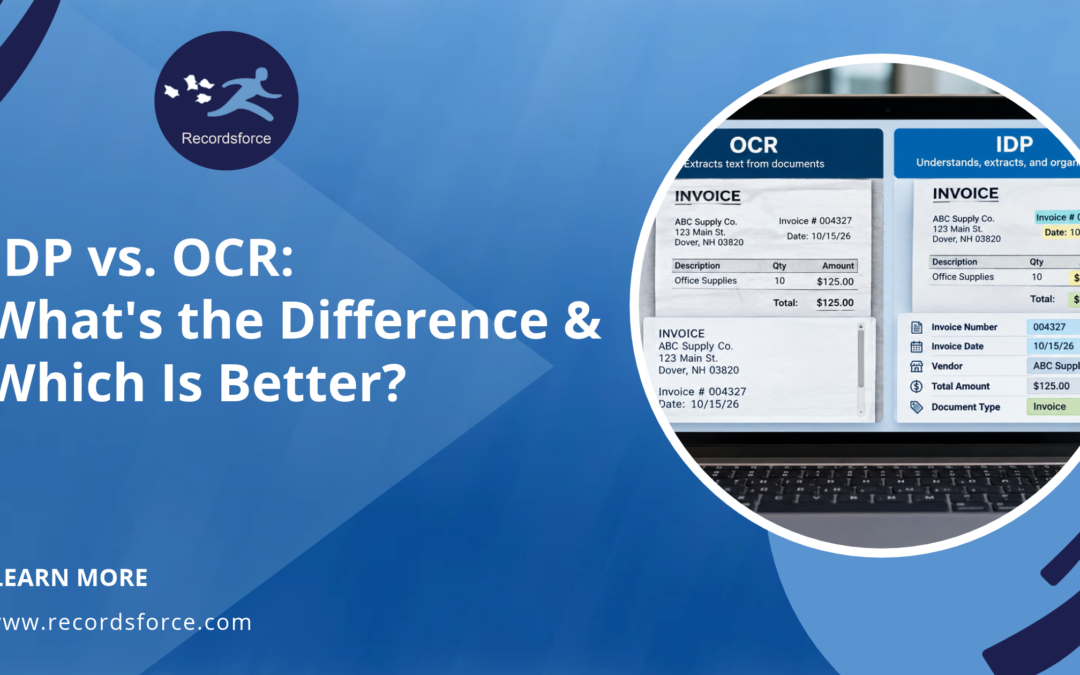
Traditional OCR can recognize the text on an invoice, but it may not automatically determine which number represents the invoice total, which date is the payment deadline, or which vendor issued the document.
Additional software, rules, or manual intervention may be required to interpret and organize that information.
OCR accuracy can also be affected by poor scan quality, handwriting, unusual layouts, and damaged documents.
Bottom line: OCR is useful when the primary goal is converting documents into readable or searchable digital text.
What Is Intelligent Document Processing (IDP)?
Intelligent Document Processing (IDP) is a document automation technology that uses OCR, artificial intelligence, machine learning, and other data processing techniques to extract, classify, validate, and organize information from documents.
Unlike standalone OCR, IDP is designed to help businesses understand document content and use extracted information within business processes.
For example, an IDP system processing an invoice may identify:
- Vendor name
- Invoice number
- Invoice date
- Payment due date
- Total amount
- Purchase order number
That information can then be validated and delivered to an accounting system, document management platform, or approval workflow.
Rather than simply digitizing the invoice, IDP helps automate the steps required to process it.
How Does Intelligent Document Processing Work?
Although capabilities vary by platform, IDP typically includes six stages.
- Document Capture
Documents are collected from sources such as scanned paper, email attachments, PDFs, or digital mailroom systems.
- Document Classification
AI-powered classification identifies the document type, such as an invoice, insurance claim, contract, or application.
- Data Extraction
OCR and other extraction technologies identify relevant fields and capture the information needed for processing.
- Data Validation
Extracted information is checked for accuracy, completeness, and consistency. Depending on the solution, exceptions or low-confidence results may be routed to human reviewers.
- Data Organization
Validated information is structured and associated with the appropriate document, record, or business process.
- Data Delivery and Workflow Automation
Documents and extracted data are delivered to downstream systems, where they can support routing, approvals, reporting, and other automated workflows.
This process helps reduce manual data entry and makes document information more accessible across an organization.
IDP vs. OCR: Key Differences
Although OCR and IDP are closely related, their capabilities differ in several important ways.
|
Feature |
OCR |
IDP |
|
Primary Function |
Converts document images into text |
Extracts, interprets, and processes document information |
|
Text Recognition |
Yes |
Yes, often using OCR |
|
Document Classification |
Not typically included |
Yes |
|
AI and Machine Learning |
Not required for traditional OCR |
Commonly used |
|
Data Extraction |
Primarily text recognition |
Targeted fields and structured information |
|
Data Validation |
Limited without additional tools |
Often includes automated checks and human review |
|
Workflow Automation |
Requires additional systems |
Can support automated document workflows |
|
Document Types |
Best suited to text recognition tasks |
Can handle structured, semi-structured, and unstructured documents |
|
Human Intervention |
Often needed for interpretation |
Can reduce manual work through automation and exception handling |
|
Best Use Case |
Document digitization and searchability |
End-to-end document data processing |
The key takeaway: OCR makes documents digitally readable, while IDP helps make the information within those documents actionable.
Real-World Example: Processing an Invoice With OCR vs. IDP
Consider a company that receives hundreds of vendor invoices each week.
Using OCR
The company scans its invoices and uses OCR to convert the printed information into digital text.
Employees can search the documents and copy information from them, but they may still need to:
- Identify the vendor
- Locate the invoice number
- Enter payment amounts
- Verify invoice details
- Route invoices for approval
- Upload information into an accounting system
Although OCR eliminates some manual transcription, employees may still spend considerable time processing each invoice.
Using IDP
With IDP, the company can automate more of the process.
The system can:
- Recognize that the incoming document is an invoice.
- Identify and extract the vendor name, invoice number, amount, and due date.
- Validate extracted information against defined rules.
- Flag missing or inconsistent information for review.
- Send validated data to the appropriate accounting or accounts payable workflow.
This reduces repetitive data entry and helps employees focus on exceptions and higher-value tasks.
The result: IDP can transform invoice processing from a document-reading task into a more automated business workflow.
What Types of Documents Can IDP Process?
One of the biggest advantages of Intelligent Document Processing is its ability to support multiple document types and layouts.
IDP solutions can be configured to process structured, semi-structured, and unstructured documents.
Structured Documents
Structured documents follow a consistent layout.
Examples include:
- Standardized applications
- Tax forms
- Predefined questionnaires
- Government forms
Semi-Structured Documents
Semi-structured documents contain recognizable information but may vary in layout or format.
Examples include:
- Invoices
- Purchase orders
- Insurance claims
- Bank statements
- Explanation of Benefits (EOB) documents
Unstructured Documents
Unstructured documents do not follow a predictable layout.
Examples include:
- Business correspondence
- Contracts
- Letters
- Legal documents
- Medical narratives
The ability to process these documents depends on the IDP solution, the quality of the source material, and the complexity of the information being extracted.
Which Industries Benefit Most From Intelligent Document Processing?
Organizations across many industries use IDP to reduce manual document handling and improve access to business-critical information.
Healthcare
Healthcare organizations process significant volumes of patient correspondence, claims, EOBs, referrals, and billing documents.
IDP can help extract patient identifiers, claim numbers, dates, and other relevant information to support administrative workflows.
When handling protected health information (PHI), organizations must also evaluate appropriate security controls and HIPAA requirements.
Insurance
Insurance companies receive claims forms, supporting documentation, policy updates, and customer correspondence.
IDP can help classify incoming documents, extract policy or claim information, and route documents to the appropriate processing teams.
Accounts Payable
Accounts payable departments often manage invoices from multiple vendors, each using different formats.
IDP can help standardize invoice data extraction, reduce manual entry, and support approval workflows.
Banking and Financial Services
Financial institutions process loan applications, financial statements, account documents, and customer correspondence.
IDP can assist with extracting key information, identifying missing fields, and organizing documents for downstream review.
Government and Public Sector
Government agencies frequently manage high volumes of applications, permits, forms, and supporting records.
IDP can help digitize and organize information while reducing repetitive administrative tasks.
When Should a Business Use OCR Instead of IDP?
Not every organization needs advanced document processing automation.
OCR may be sufficient when the primary objective is to digitize documents and make their contents searchable.
OCR may be the better choice when:
- Documents are being scanned primarily for archival purposes.
- Employees need searchable PDFs rather than extracted data.
- Document processing volumes are relatively low.
- There is little need for automated classification or routing.
- The business does not need to transfer document data into other systems.
For example, a company digitizing historical records for long-term storage may benefit from OCR without requiring a comprehensive IDP solution.
However, if those same documents must be classified, analyzed, or used to trigger business processes, IDP may provide additional value.
When Is IDP a Better Choice Than OCR?
IDP is often the better option when businesses need to process information from documents rather than simply digitize them.
Organizations should consider IDP when they:
- Receive large volumes of incoming documents.
- Spend significant time manually entering document data.
- Process documents with varying formats and layouts.
- Need to extract specific information from invoices, claims, or applications.
- Want to reduce document processing delays.
- Require automated document classification and routing.
- Need to integrate extracted data into business systems.
- Want greater consistency and visibility across document workflows.
For these organizations, IDP can help eliminate repetitive tasks and create more scalable document processing operations.
How Do OCR and IDP Work Together?
OCR and IDP are not competing technologies. In many document automation solutions, they work together.
OCR serves as the text recognition layer, converting scanned documents and images into machine-readable text.
IDP builds on that capability by identifying document types, extracting relevant fields, validating information, and supporting downstream automation.
For example, consider an incoming insurance claim:
- OCR recognizes the text on the scanned claim.
- IDP classifies the document as an insurance claim.
- IDP extracts the claim number, policyholder information, and relevant dates.
- Validation checks the extracted information and flags potential errors.
- Workflow automation routes the document and data to the appropriate system or department.
By combining OCR and IDP, businesses can move beyond basic digitization and automate more of their document processing operations.
How Does IDP Work With a Digital Mailroom?
A digital mailroom and Intelligent Document Processing can work together to automate the handling of incoming business mail.
A digital mailroom captures and digitizes incoming physical mail, while IDP helps classify documents and extract the information needed for processing.
For example, a business may receive invoices, insurance correspondence, contracts, and customer documents through the mail.
Instead of manually opening, sorting, scanning, and distributing every document, a digital mailroom solution can centralize mail intake and digitization.
IDP can then help:
- Identify document types
- Extract relevant information
- Validate critical data
- Organize documents
- Support routing to the appropriate teams or business systems
When combined with a document management system, these capabilities can help organizations create a more connected workflow from document receipt through processing and retrieval.
How to Choose Between OCR and IDP
Before investing in document processing technology, businesses should evaluate their operational needs.
Consider the following questions:
- What is the primary goal?
If the goal is to create searchable digital copies of paper documents, OCR may be sufficient.
If the goal is to automate data extraction and processing, IDP may be more appropriate.
- How many documents are processed?
Higher document volumes often increase the potential value of automation.
- How complex are the documents?
Documents with inconsistent formats, multiple fields, or varying layouts may benefit from IDP capabilities.
- What happens after a document is scanned?
If employees must manually enter information, verify fields, or route documents, IDP may help reduce those steps.
- Does the solution integrate with existing systems?
Businesses should evaluate whether extracted data can be delivered to their document management system, accounting software, CRM, or other business applications.
- What level of accuracy and oversight is required?
Consider validation processes, human review, exception handling, security requirements, and auditability.
The right solution depends on how documents are used throughout the organization, not simply how they are captured.
Frequently Asked Questions About IDP vs. OCR
Is IDP the same as OCR?
No. OCR converts text from scanned documents and images into machine-readable text. IDP uses OCR and other technologies to classify documents, extract specific information, validate data, and support automated workflows.
Does IDP use OCR?
Yes, many IDP solutions use OCR to recognize text within scanned documents and images. IDP then applies additional technologies, such as AI and machine learning, to identify relevant information and automate processing tasks.
Is IDP better than OCR?
IDP is generally more capable when organizations need document classification, targeted data extraction, validation, and workflow automation. However, OCR may be sufficient for businesses that only need to digitize documents and make them searchable.
Can OCR extract data from invoices?
OCR can recognize the text and numbers printed on invoices. However, identifying specific fields, such as invoice numbers, vendor names, and payment totals, typically requires additional extraction software, rules, or IDP capabilities.
Can IDP process handwritten documents?
Some IDP solutions can process handwritten documents using handwriting recognition technologies. Accuracy varies depending on handwriting quality, document format, and the capabilities of the software.
Can IDP integrate with existing business software?
Yes. Many IDP solutions support integration with document management systems, accounting platforms, enterprise resource planning (ERP) systems, and other business applications through APIs, file transfers, or other integration methods.
Does IDP eliminate manual data entry?
IDP can significantly reduce manual data entry, but it does not necessarily eliminate human involvement. Complex documents, exceptions, low-confidence extractions, and business-specific validation requirements may still require review.
Move Beyond OCR With Intelligent Document Processing
OCR has played an important role in helping businesses transition from paper-based records to digital documents. However, organizations looking to automate document-heavy processes often need more than text recognition.
Intelligent Document Processing builds on OCR by helping businesses classify documents, extract relevant information, validate data, and automate workflows.
For organizations managing large volumes of incoming documents, the combination of OCR, IDP, and document workflow automation can improve efficiency, reduce repetitive tasks, and make business information more accessible.
Simplify Document Processing With Recordsforce
At Recordsforce, we help organizations streamline document-intensive processes through Intelligent Document Processing, document scanning, digital mailroom services, and document management solutions.
Our approach combines automation technology with human validation to help businesses capture, classify, extract, and deliver critical document information accurately and efficiently.
Whether you’re looking to automate invoice processing, streamline incoming mail, or reduce manual data entry, Recordsforce can help you develop a document processing solution that fits your business.

